Tips for GameMaker C++ Extensions
Covering windows hooks, swap chain hooks, and buffer read / write.
Recently my attention has come to creating a DLL to extend functionality and I want to share some things I learned.
Creating The Extension
I won't cover this as it is already outlined on GameMaker's blog or many other places. You should also do some reading on DLLs in general. Here's a checklist:
- Install Visual Sudio
- Create a c++ project
- Define a function using
extern "C" __declspec(dllexport) - In GameMaker create Extension
- Add DLL
- Add Function to DLL. Internal name is what GML uses, External name is what you wrote in c++
- ensure all the types match or the function will not work
Abusing types
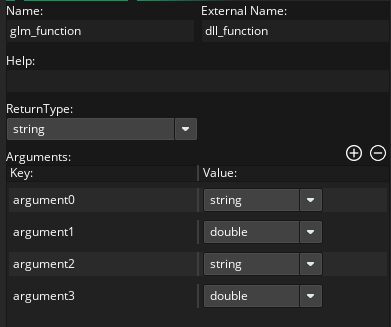
Gamemaker extensions only expose two types, char* and double. Double can be used for all numbers and char* can be used for basically anything else. can pass in a string or you can abuse it as a ptr to memory from gamemaker. Note that if your arguments don't match in C++ your function will not be called and you also wont get any errors or warnings about it! So double check your types.
Sending data between c++ and gml
Obviously you can declare functions in c++ and call them in GameMaker but you can also get the address of a buffer in gamemaker and write to that to send large amounts of data back and forth.
/// gml side
buffer = buffer_create(1024 * 1024, buffer_fixed, 0);

buffer_write(buffer, buffer_string, "Hello from game maker. What's my age again?");
buffer_write(buffer, buffer_u8, 23);

// tell c++ to read the buffer and write us back
gm_extension_read_buffer(buffer_address(buffer))

// rewind GMs "buffer current" to start to read what c++ told us
buffer_seek(buffer, 0, 0);

// show the c++ message
var _str = buffer_read(buffer, buffer_string);
show_message(_str);
/// cpp side
extern "C" __declspec(dllexport)
double gm_function_read_buffer(const char* buffer_start)
{
char* buffer_current = buffer_start
// using strlen will find the null terminated string that gm wrote in buffer_string
size_t length = std::strlen(str_start);
std::string gamemaker_message(str_start, length);
// increment the pointer so we have the next read position
buffer_current += length + 1; // size for terminator
std::cout << "GameMaker said " << gamemaker_message << '\n';
uint8_t age = 0;
memcpy(&age, buffer_current, sizeof(uint8_t));
// you would normally increment the pointer like this some more but it is not
// useful here since we are about to seek to the start but heres what it looks like
buffer_current += sizeof(uint8_t);
// rewind the buffer position like in gml
buffer_current = buffer_start
// prepare message for gm
std::string str = "Nobody likes you when you're " + std::to_string(age);
// write the message to start of buffer
memcpy(out_buffer_current, str.c_str(), str.size());
// again incrementing size is not useful in this exact function but this is what it looks like
out_buffer_current += str.size();
// write a null termination so gm's buffer_string read will know where to stop
*out_buffer_current = '\0';
out_buffer_current += 1; // size for terminator
}This above example is more useful when you're already familiar with packing data into buffers and reading it. If you are not be careful not to read out of bounds of the memory and you must sometimes invent your own solutions for knowing when the "end of the messages are".
But this is a great way to transfer large amounts of data in and out of GameMaker such as collections of values or big blobs of data like textures.
Hooking into the the window Message Queue
GameMaker appears to be a bit of a closed system but it is still using Microsoft Windows which people have been successfully hacking for years. By hooking into the message loop you can overwrite things such as Keyboard & Mouse Input and redirect them or stop them from reaching GameMaker entirely
/// gml side
gm_extension_hook_win_messages(window_handle())
/// c++ side
LRESULT CALLBACK hook_proc(int n_code, WPARAM w_param, LPARAM l_param)
{
if (n_code >= 0 && w_param == PM_REMOVE)
{
const MSG* msg = (MSG*)l_param;
switch (msg->message)
{
case WM_MOUSESWHEEL:
// this is here for the sake of example, do something with the values
// you are reading
my_custom_process->use_mouse_wheel(GET_WHEEL_DELTA_WPARAM(msg->wParam));
// by returning we avoid CallNextHook and prevent the wheel message from getting to
// GameMaker. get fucked GameMaker!
return 1;
}
}
// return the message back to GM
return CallNextHookEx(NULL, n_code, w_param, l_param);
}
extern "C" __declspec(dllexport)
double gm_function_hook_win_message(const char* window_ptr)
{
const HWND game_hwnd = (HWND)(window_ptr);
SetWindowsHookEx(WH_GETMESSAGE, hook_proc, nullptr, GetWindowThreadProcessId(game_hwnd, nullptr));
}Hooking into the Swap Chain ( rendering )
If you want to hijack GameMakers rendering to modify it or render things on top of it you can actually get the function ptr to GameMakers swap chain RESIZE and PRESENT functions and then do whatever you want with them.
What is a swap chain?
A swap chain is a technique where you have a BackBuffer ( offscreen ) and a FrontBuffer ( on screen ). The player looks at the FrontBuffer while the game renders to the BackBuffer. There is delay from the time your CPU instructions are sent to the GPU and rendered - it is not an immediately flush of the commands. When the commands are finished the swap chain writes the backbuffer into the fron buffer and the player can see it.
The plan as a timeline:
- Gamemaker resizes the window on launch
- Resize is intercepted and get a handle to the back buffer
- Gamemaker clears the backbuffer to prepare for a frame
- Gamemaker does the Draw Event and Draw GUI Event
- Gamemaker requests a Present()
- Present is intercepted
- { your custom rendering code here }
- Proceed with Present()
Accessing the vtable and replacing the functions
function pointers are stored in a vtable and if you are determined you can find the vtable and hook a function.
// function signatures that we want to steal
typedef HRESULT(__stdcall* swap_chain_present_fn_t)(IDXGISwapChain*, UINT, UINT);
typedef HRESULT(__stdcall* swap_chain_resize_t)(IDXGISwapChain*, UINT, UINT, UINT, DXGI_FORMAT, UINT);

// location to store the original functions as we still want to call them
static swap_chain_present_t original_present_fn = nullptr;
static swap_chain_resize_t original_resize_fn oResizeBuffers = nullptr;

void create_hooks()
{
    // first create a dummy swap chain to probe for memory locations, i am not sure how little you need to set up here it just
    // needs to not fail creation
    DXGI_SWAP_CHAIN_DESC swap_chain = {};
    swap_chain.BufferCount = 1;
    swap_chain.BufferDesc.Width = 1;
    swap_chain.BufferDesc.Height = 1;
    swap_chain.BufferDesc.Format = DXGI_FORMAT_R8G8B8A8_UNORM;
    swap_chain.BufferUsage = DXGI_USAGE_RENDER_TARGET_OUTPUT;
    swap_chain.OutputWindow = GetForegroundWindow();
    swap_chain.SampleDesc.Count = 1;
    swap_chain.Windowed = TRUE;

    IDXGISwapChain* swap_chain = nullptr;
    ID3D11Device* device = nullptr;
    ID3D11DeviceContext* context = nullptr;

   D3D11CreateDeviceAndSwapChain(
        nullptr, D3D_DRIVER_TYPE_HARDWARE, nullptr, 0,
        nullptr, 0, D3D11_SDK_VERSION, &sd, &swapChain, &device, nullptr, &context);

    // vtable for swap chains
    void** vtable = *reinterpret_cast<void***>(swapChain)

    DWORD old_protection;

    // FINDING THE PRESENT FUNCTION

    // change the memorys access type so we can change it; also store original protection so we can replace it
    VirtualProtect(&vtable[8], sizeof(void*), PAGE_EXECUTE_READWRITE, &old_protection);

    // use hardcoded vtable[8] which right now points to the PRESENT function
    original_present_fn = reinterpret_cast<Present_t>(vtable[8]);

    // more on this later but present_hook is our function we want to call instead
    vtable[8] = reinterpret_cast<void*>(&present_hook);

    // finally replace the READWRITE protection with whatever it was before
    VirtualProtect(&vtable[8], sizeof(void*), old_protection, &old_protection);

    // FIND THE RESIZE FUNCTION
    // this is the same as above but for vtable 13
    VirtualProtect(&vtable[13], sizeof(void*), PAGE_EXECUTE_READWRITE, &old_protection);
    original_resize_fn = reinterpret_cast<ResizeBuffers_t>(vtable[13]);
    vtable[13] = reinterpret_cast<void*>(&resize_hook);
    VirtualProtect(&vtable[13], sizeof(void*), old_protection, &old_protection);

    // we dont care about these resources we only created them to find the addresses so just
    // get rid of them
    swap_chain->Release();
    device->Release();
    context->Release();
}
Custom RESIZE function
Resize is a good place to probe the swapchain for size and texture handle.
// store for use between functions
static ID3D11Texture2D* game_back_buffer = nullptr;
static ID3D11Device* game_device = nullptr;
static ID3D11DeviceContext* game_context = nullptr;
static int g_width = 0;
static int g_height = 0;

HRESULT __stdcall resize_hook(IDXGISwapChain* swap_chain, UINT buffer_count, UINT width, UINT height, DXGI_FORMAT format, UINT flags)
{
    // the old back buffer is no longer in use by gm so null it out
    game_back_buffer = nullptr;

    // you probably want these to do interesting things with later
    g_width = width;
    g_height = height;

    HRESULT hr = original_resize_fn(swap_chain, buffer_count, width, height, format, flags);

    if (!game_device)
    {
        // this only needs to happen once
        swap_chain->GetDevice(__uuidof(ID3D11Device), (void**)&game_device);
        game_device->GetImmediateContext(&game_context);
    }

    // get a handle to use in the PRESENT hook
    swap_chain->GetBuffer(0, __uuidof(ID3D11Texture2D), (void**)&game_back_buffer);

    return hr;
}
Custom PRESENT function
All that is left is to just manipulate the buffer and present. Be cautious that it is unsafe to use GetBuffer() here in present, you should do it in resize like shown above.
HRESULT __stdcall present_hook(IDXGISwapChain* swap_chain, UINT sync, UINT flags)
{
    if (game_context && game_back_buffer)
    {
        // here im just going to clear the whole back buffer to blue but you can render
        // anything you want like draw a HTML renderer or UI renderer

        // set render target to backbuffer
        game_context->OMSetRenderTargets(1, &game_back_buffer, nullptr);

        // define a viewport to render about
        D3D11_VIEWPORT viewport = {0, 0, (float)(g_width), (float)(g_height), 0.0f, 1.0f};
        game_context->RSSetViewports(1, &viewport);

        // clear the black buffer with blue
        constexpr float color[4] = {0.0f, 0.0f, 1.0f, 1.0f};
        game_context->ClearRenderTargetView(game_back_buffer, color);
    }

    // ask the swap chain to take GMs back buffer, which you've just painted on top of, and show it to the player.
    return original_present_fn(swap_chain, sync, flags);
}